Email outreach software sends personalised emails and automatic follow-ups from your own mailboxes and manages the replies. Look for sequences that stop on reply, sending limits and warm-up, a unified inbox and reporting; for link building also deal tracking and live link checks.
Updated 25 October 2026 · Pink Post editorial team
Email outreach software sends personalised emails and follow-ups to a list of contacts from your own mailboxes, stops when someone replies, and helps you manage the replies. It is used for link building, PR, partnerships and sales.
Features to look for
Own mailboxes: send through Gmail, Outlook or SMTP so replies come to you.
Sequences: follow-ups with delays and conditions that stop on reply.
Deliverability controls: daily and hourly limits, random delays, warm-up, rotation, SPF/DKIM/DMARC checks.
Personalisation: placeholders with fallbacks and spintax.
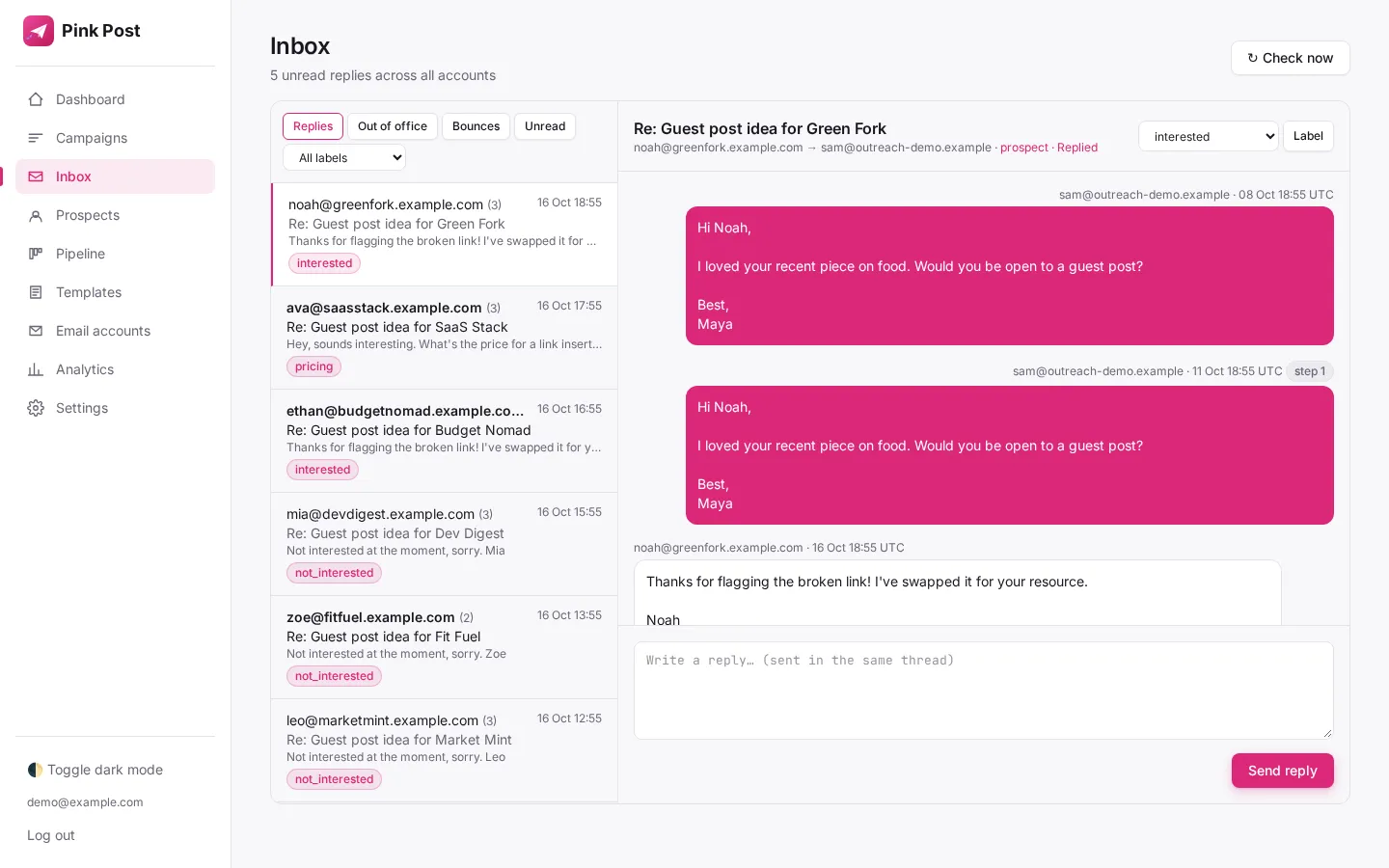
Unified inbox: every reply in one place.
Reporting: reply rate and results per campaign.
Email outreach software compared
Tool
Best for
Starting price
Pink Post
Link building outreach
Free; $19/mo
Instantly
High-volume sales email
$47/mo
Lemlist
Multichannel sales
$69/mo
Hunter
Finding emails + simple sequences
Free; $49/mo
BuzzStream
Outreach CRM for PR and links
$49/mo
Pitchbox
Enterprise SEO outreach
$210/mo annual
Vendor pricing pages, checked 25 Oct 2026.
How to choose
Decide the job: link building, sales or PR.
Count mailboxes and emails you need each month.
Check deliverability controls are on by default.
Check what happens after the reply: deals, prices, results.
Start on a free plan or trial before paying yearly.
Unified inbox in Pink Post
AI email outreach software
"AI email outreach software" now covers three different things, and it helps to know which you are buying:
AI writing help: drafting a first line or a whole email from prospect data. Pink Post does this with your own OpenAI, Anthropic or xAI key, so you pay the model provider directly and keep control of prompts.
AI reply handling: classifying replies. Pink Post labels replies with keyword rules (interested, negotiating, later, not interested, wrong person, out-of-office), which are predictable and easy to correct.
Agentic AI: software that researches prospects and sends on its own. Pink Post\'s agentic assistants are coming soon and will ask for approval before sending.
Whatever the tool, read every AI-written email before it goes out. Editors recognise generic AI pitches quickly.
Free email outreach tools
Free plans are fine for testing a pitch on a small list. What you get for free in Pink Post: 1 mailbox, 2 campaigns, 500 prospects, 300 emails a month and 25 live link checks. Hunter\'s free plan includes 50 credits and 1 connected mailbox. Check the limits on emails per month and prospects before you rely on a free plan for a real campaign.
Cold email outreach software vs link building outreach software
Cold email software
Link building outreach software
Goal
Book meetings, sell
Earn links and placements
Typical volume
Thousands to hundreds of thousands a month
Hundreds to a few thousand
Prospect
A person at a company
A site and its editor
After the reply
CRM, meeting
Negotiation, price, publishing, link check
Key extras
Lead database, LinkedIn steps
Playbooks, deal prices, live link checks
Examples
Instantly, Lemlist, Smartlead
Pink Post, BuzzStream, Pitchbox
Email outreach example for link building
Here is a link insertion pitch that fits on a phone screen:
Subject: A source for your {article topic} post\n\nHi {first_name|there},\n\nYour guide to {article topic} is one of the clearest I\'ve read.\nOne thing: the section on {subtopic} links to a 2019 study\nthat no longer loads.\n\nWe published an updated version with 2026 data here: {url}.\nIt might be a useful swap for readers.\n\nThanks either way,\n{sender_name}
It is specific, short, helps the editor fix a problem, and makes a single request. Follow up once after four days if there is no reply. More templates are in the blogger outreach guide.
What email outreach software costs
Most tools price by a mix of mailboxes, contacts and emails per month. Compare the plan you would actually need, not the cheapest one listed.
Tool
Plans (monthly)
What sets the limit
Pink Post
Free / $19 / $39 / $129
1 / 3 / 10 / 30 mailboxes
Instantly
$47 / $97 / $358
Unlimited accounts; 1k / 25k / 100k contacts
Hunter
Free / $49 / $149 / $299
1 / 3 / 10 / 20 mailboxes
Lemlist
$69 Email; $109/user Multichannel
Unlimited senders on Email
BuzzStream
$49 / $174 / $424
Bulk send from $174
Pitchbox
$300 / $600 / $1,200 (monthly)
2 email accounts on Pro
Vendor pricing pages, checked 25 Oct 2026.
For link building, a solo builder with 3 mailboxes and 2,000–3,000 emails a month pays $19 in Pink Post, $37.60–$49 in Instantly or Hunter, and $174+ to automate in BuzzStream. Yearly billing usually saves 15–30%.
Email outreach software for link building
Link building adds steps that sales tools leave out. You negotiate prices per placement, wait days or weeks for a post to go live, and need to know months later whether the link is still there. Look for reply labels that catch price quotes, a pipeline with a price field, and scheduled checks of the published pages. These are the parts of the Pink Post platform built specifically for link builders.
Volumes are lower
A link building campaign might send a few hundred emails, not tens of thousands. Plans priced per emails or contacts at sales-tool volumes often cost more than you need.
Replies matter more than opens
Open tracking is unreliable and can hurt deliverability, so measure reply rate and deals done.
Deliverability basics
Set up SPF, DKIM and DMARC, keep each mailbox around 30 emails a day, warm new mailboxes up, verify lists, and keep bounce rates under 2–3%. Read about sending limits and the DNS checker.
FAQ
Questions, answered
What is the best email outreach software?
It depends on the job: Pink Post for link building, Instantly or Lemlist for sales, BuzzStream or Pitchbox for larger PR/SEO teams.
Is there free email outreach software?
Pink Post and Hunter have free plans.
What is the best AI email outreach software?
For link building, use a tool that lets you review AI drafts before sending; Pink Post drafts intros with your own AI key and agentic assistants are coming soon.
How many outreach emails can I send per day?
About 30 per mailbox is a safe default for cold outreach, after warming new mailboxes up. Send more by adding mailboxes, not by raising one mailbox's limit.
Is outreach software the same as a CRM?
No. A CRM stores relationships and deals; outreach software sends and follows up. Pink Post combines both for link building with its deal pipeline.
Can I use cold email software for link building?
Yes, but you will track prices, publishing and live links elsewhere, usually in a spreadsheet.
Is email outreach software legal?
Yes, when you follow laws like CAN-SPAM and GDPR: identify yourself, include an opt-out, and contact people for a legitimate reason.
Run your next outreach campaign in Pink Post.
Free plan, no card. Connect your mailbox, import a list and launch a link-building playbook.
 Pink Post